Last updated: November 17, 2026
1. What messages you may receive
LaterLess is client-management software for accounting firms. When a client of a firm that uses LaterLess turns on text reminders, LaterLess texts them from (872) 231-5377 about:
- Document requests — the firm asked for a document (for example a W-2 or a bank statement).
- Reminders — something the firm requested is still outstanding.
- Checklists and signatures — a tax checklist to fill in, or a document such as an e-file authorization to sign.
- One-time codes — a 6-digit code that confirms the client's number when they turn texts on.
We never send marketing or promotional texts. Every text starts with “LaterLess:” and names the client's firm. Sample messages:
LaterLess: Harbor & Main CPAs requested a document from you: W-2. Open the LaterLess app or your client portal to upload it. Reply STOP to opt out.LaterLess: reminder: Harbor & Main CPAs is still waiting on September sales. Open the LaterLess app or your client portal. Reply STOP to opt out.LaterLess: Harbor & Main CPAs sent you a document to sign: 2025 Form 8879. Open the LaterLess app or your client portal to sign it. Reply STOP to opt out.LaterLess: your code is 123456. It confirms text reminders from Harbor & Main CPAs about your documents (msg & data rates may apply). Reply STOP to opt out.
2. How we collect consent
Texts are off by default. Only the client can turn them on, in the LaterLess mobile app (Settings → Text reminders) or on the home page of their client portal (Text reminders → Turn on). Firms cannot opt a client in. It is a double opt-in:
- The client turns on Text reminders, enters their mobile number and sees the consent text below next to the Send code button.
- LaterLess texts a 6-digit code to that number.
- The client enters the code. Only then are reminders sent; the time of this confirmation is kept as the consent record.
Consent text shown at opt-in:
By tapping Send code, you agree to get automated LaterLess text reminders from [the client's accounting firm] about documents and requests. Up to 6 msgs/day. Msg & data rates may apply. Reply HELP for help, STOP to opt out. Consent isn’t a condition of service. Terms · Privacy
Opt-in workflow screenshots (LaterLess app; the client portal shows the same text and steps):
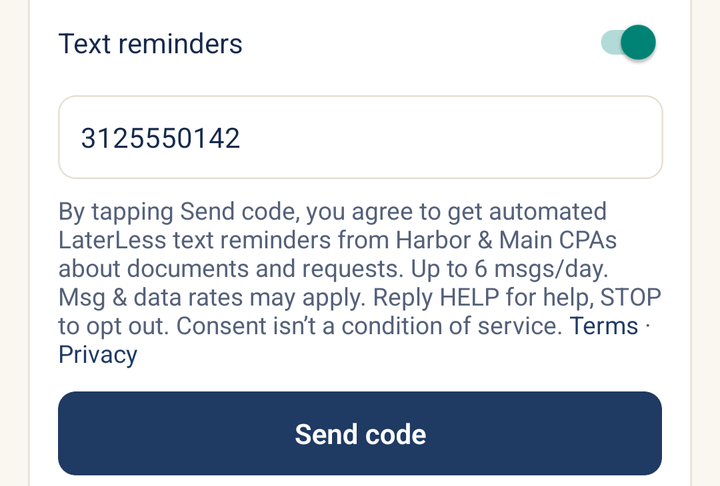
Step 1 — the client turns on Text reminders, enters their number and reads the consent text before tapping Send code.
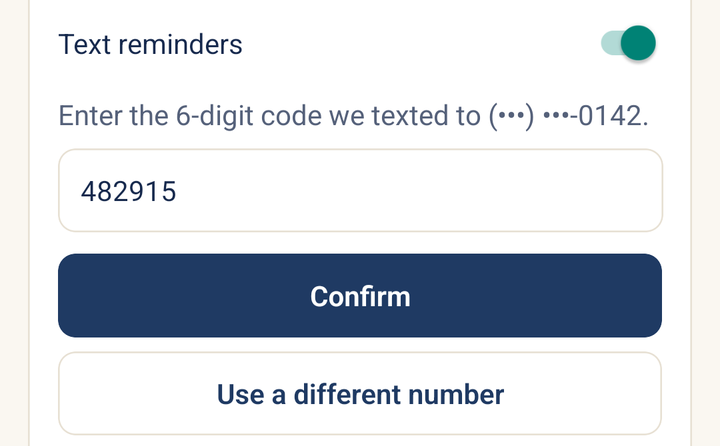
Step 2 — the client confirms the 6-digit code texted to that number.
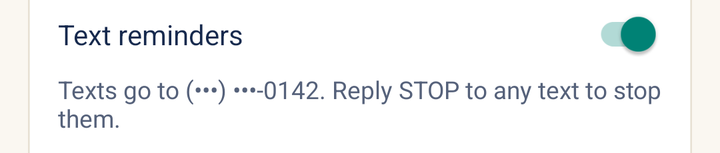
Step 3 — texts are on. The client can switch them off here at any time, or reply STOP.
3. Message frequency
Message frequency varies with what the client's firm needs, up to 6 messages per day. No texts are sent between 9 pm and 8 am in the firm's time zone.
4. Message & data rates
Message and data rates may apply, depending on your mobile plan. LaterLess does not charge clients for texts. Carriers are not liable for delayed or undelivered messages.
5. How to opt out or get help
| Reply | What happens |
|---|---|
| STOP | Unsubscribes you from all LaterLess texts. You get one confirmation and no further texts. |
| HELP | Sends help and contact information. |
| START | Subscribes you again after STOP. |
You can also turn off Text reminders in the app or client portal at any time. Help: support@uselaterless.com or call/text (872) 231-5377.
6. Your privacy & data
- We use your mobile number only to send the reminders and codes you asked for.
- We do not sell or share your mobile number or your texting consent with third parties or affiliates for their marketing.
- Phone numbers and opt-in data are shared only with the carriers and messaging providers that deliver the messages.
- Turning texts off removes your number from text reminders. See our Privacy Policy for details and how to request deletion.
7. Questions?
Email support@uselaterless.com, call or text (872) 231-5377, or use our contact page. Full terms: Terms of Service.